The website
A model's page
Everything on a shared model's page, from the 3D viewer and Build it to likes, comments, builds and the parts list.
Every shared model has a page at brickworks.diy/m/<id>, which anyone can open with no account.
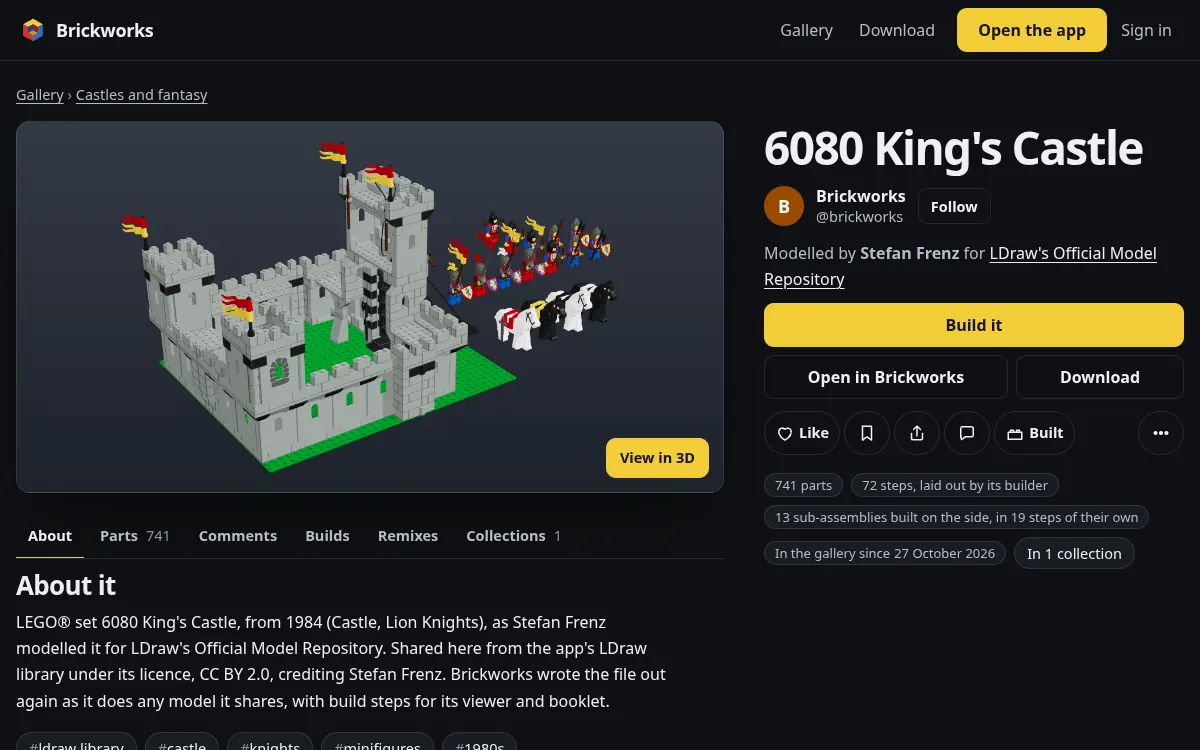
The viewer
View in 3D on its picture opens the model in 3D: turn it, zoom, look from any side, step through its build, and open its booklet and parts list. In the app, /app?view=<id> opens the same model to look at; nothing there can change it.
Build it
Build it on the viewer's bar plays the steps as a booklet does, a step at a time, the new parts shown going on, on a phone, a tablet or a computer. A comment's step pill opens it at that step (/app?view=<id>&step=<n>).
Play with it
A model with something that moves says so under the bar (Moves: steering, boom): drag a part that moves, with the mouse or a finger, and it moves on its real joints. Reset puts it back. Its own motions are buttons to play.
Pictures and tabs
Under the picture is a strip: the published picture, its owner's photos and photos of real builds people sent; choose one to see it large. Its owner can Add a picture. Then the tabs: About, Parts, Comments, Builds, Remixes, Collections, and Versions once it has more than one.
The action bar
- Build it, Open in Brickworks (a copy in your own models) and Download are first.
- Like and Save (to your Favourites or one of your collections) sign you in on the way if they need to.
- Share opens a sheet with the link and Copy link; Post it to Reddit, Bluesky, Pinterest, X, Facebook or email, each opening that site's own page for sharing it in a new tab; and the code to embed the model in a page of your own (
/m/<id>/embed), its picture and name with Build it; View in 3D on the embed's picture turns the model right there in that page, as on its own page. On a phone the sheet also offers your device's own share sheet. Paste the model's bare link into a blog, Notion or a forum that reads oEmbed and it becomes that embed by itself. - Comment goes to the comments.
- Built (I built it) says you built it, with a photo of your build if you like; the photo is cleaned of what the camera wrote into it before it is kept.
- More has Report it and the takedown page.
- On your own model's page, Enter this month's challenge sits under Like (the challenge).
Comments
Comments are newest first, with Reply under each. A comment can name a step of the build: its pill opens the viewer at that step, and the app's timeline counts each step's comments. People 13 and over can comment; a model's owner can turn comments off.
Mention someone
Type @ in a comment or a reply and the people on the page are offered: its designer, then whoever commented. Keep typing to narrow it; the arrow keys and Enter (or a click) put one in, Escape closes the list and keeps what you wrote. Any public profile's @handle works typed out in full.
Each person named becomes a link to their page and hears of it in their notifications, with what you said. Up to three people a comment are told, once each, however often it is edited. Nobody is told twice: the model's designer already hears of every comment, and someone in the conversation hears of each reply. Hiding or deleting the comment takes the notification with it.
Parts and download
The Parts tab lists every part by colour or by kind, each drawn by Brickworks, with Show all. Download it for a shop: a BrickLink wanted list (/m/<id>/parts.xml), a Rebrickable CSV (/m/<id>/parts.csv), or the list as JSON. Download gives the model itself as LDraw (/m/<id>.mpd).
What it is based on
Under its name, a model's page credits what it came from. A remix names the model it was copied from on Brickworks. Its designer can say more, up to three, with Say what it is based on on their own page:
- An alternate build of a LEGO® set: built from that set's parts, given by its number such as
6080-1, which links to the set's page here; - Changed from a set, or from work elsewhere, given by its
https://address with its title, and its author and licence when known; - Inspired by a set or work elsewhere.
Brickworks checks a set's number against the library, and says in words what is wrong with a set it has not got or an address that is not one. A link to work elsewhere is the designer's, and marked as not Brickworks's. Search engines read them in the page too, and each set's page lists the models in the gallery based on it. Change what it is based on changes or removes them. An account under 13 does not show a name or link in public, so it is not offered.
More by and similar
At the foot of the page: More by the designer, their other models by Top builds, and Similar models by kind and shared tags.
Report it
Report it (under More on a model, and on a profile or a collection) tells Brickworks about something that should not be there. For a copyright or trademark claim, see takedown requests.