The website
The gallery
Find models people built and shared, by Top builds, what is new, who you follow, kind, size and the parts you own.
brickworks.diy/gallery holds the models people built in Brickworks and shared. Anyone can browse it, with no account.
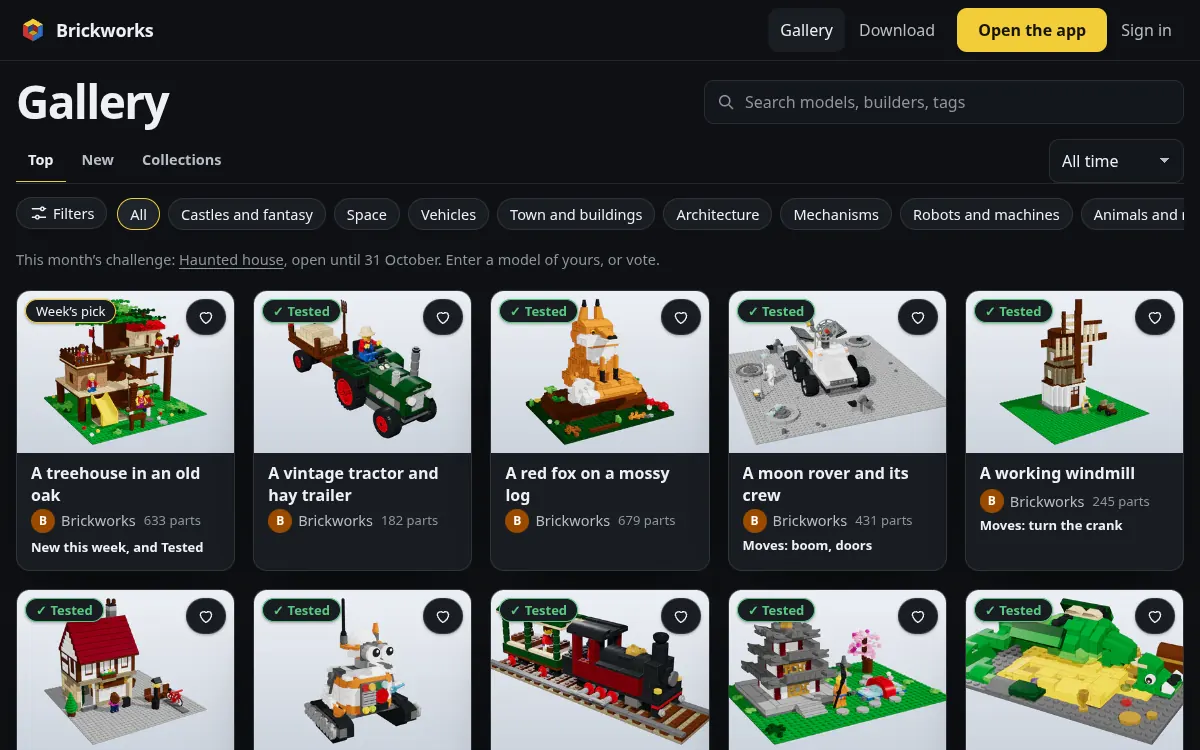
Tabs and filters
- Top puts first the models most people have built, over this week, this month or all time; New the newest; Following, signed in, the people you follow; Builds everybody's photos of real builds; Collections the directory of collections; Sets every real LEGO® set. A tab changes the list in place, under the same search and header, and the address with it (
/builds,/collections,/library), so Back returns to the tab you were on and a tab can be shared or reloaded. - Kinds are pills across the top: buildings, vehicles, space, Technic and more. They and Filters stay in view under the header as you scroll.
- Filters opens a sheet: the order, the size, how it was made (by hand, with Claude, from the LDraw library), with instructions, Technic, and Tested only; on a phone, Top's time too, so the tabs have their row to themselves. Each filter that is on shows as a pill under the bar; press one to drop it, or Clear all.
- Search by a name, a builder, a tag or a description: the search asks the tab you are on and keeps its words when you change tabs, the cards change as you type, and / jumps to the search from anywhere on the page. A misspelt word, and words run together or apart (
spaceship,space ship), find what the library's search would. The address keeps it all (/gallery?q=castle&kind=space&sort=newest), so a search can be shared.
Every list on the site pages the same way: the gallery, the LDraw library, a designer's models and likes, collections and a challenge's entries. It shows 24 at a time and says how many it shows ("Showing 1–24 of 1,575 sets"). Show more adds the next 24 under them, and nothing loads by itself as you scroll. The address keeps the page (?page=3), so it can be shared, and a link to page 3 opens page 3, with Show earlier above it. The numbered pages under the list are plain links. Back returns you to the same pages and the same card.
Builds
brickworks.diy/builds, the gallery's Builds tab, shows everybody's photos of models from the gallery built in real bricks, the newest first. Each card links to the photo on its model's page and to whoever built it. To add yours, open the model's page and choose I built it. A photo stays off the tab once its model's designer hides it or while a report of it is looked at.
The front shelves
Before you search, the gallery shows This week's pick, chosen by Brickworks, Today in the gallery and Small builds for an afternoon.
This week's pick and Today in the gallery change by themselves. Every day Brickworks features one model, chosen from what people did with it in the past 30 days: likes, builds finished, comments and remixes, with a little extra for being new. A model featured once doesn't come back for four weeks. Beside it is one set from the LDraw library, each day from a different theme and decade, and never the same set twice in 90 days. The week's pick is chosen on Monday the same way, from the past seven days. Everyone sees the same choice all day; nothing is drawn at random. Signed in with your collection, You can build now shows models you own every part for, and Sort › Parts I own ranks the rest by how much of each you have. Sort › Top builds says how it weighs each model.
A card
Every model is a card, the same everywhere on the site: its picture, its name, its designer, its part count, how many people built it, and the Tested mark when it has one. A card of a model with something that moves (steering, a boom) says so, and its page lets anybody move it.
A designer's page
/u/<handle> is a designer's page: their models by Top builds, Start with their most built, the models others built of theirs, and what their models have earned. Brickworks' own page, brickworks.diy/u/brickworks, shares the house's models.
Claude and the gallery
Claude can search the gallery and open a model as a reference, with its credit and licence (gallery), and Open in Brickworks a copy for you to change.