Compare
Studio exists. Why Brickworks?
BrickLink Studio is the community’s standard, and it does a lot well: parts from the BrickLink catalogue, photoreal renders, an instruction maker. Mecabricks, LeoCAD and LDCad have strengths of their own. Here is Brickworks beside them: six points shown in the app on real models, then the whole field, row by row, and where the others still lead.
-
In a browser, nothing to install
Open brickworks.diy/app on any computer, or on a tablet or a phone, laid out for a finger. Every tab is its own project, and your models follow you to every device you sign in on. Desktop apps too.
Studio is a desktop app for Windows and Mac.
-
Will it stand? Will it hold?
Check stability weighs each joint against what its studs can hold, and the centre of mass against the base, in every pose the hinges reach. View › Stress lists the weakest joints, worst first, and says what would fix each.
Studio’s check flags weak parts and groups that can’t stand, and calls itself “very conservative”. LDD had none.
-
Gear trains turn at their real ratios
A gear put down by hand seats in mesh with the one beside it. Simulate turns the crank and every gear follows: this orrery keeps all eight planets’ years within 0.35% of NASA’s.
Studio’s animations build the model or circle the camera. LDCad turns a mechanism by a script you write.
-
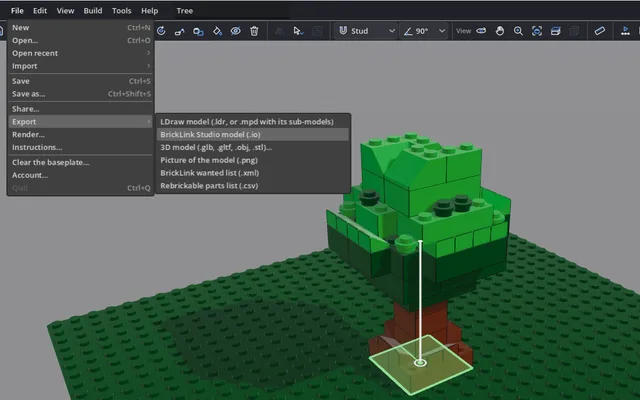
Your Studio files, in and out
Open a Studio
.io, locked ones too, with the parts only Studio has, and save back to.io. LDD’s.lxfopens as well.An
.iosaved here has not yet been tried in Studio itself. -
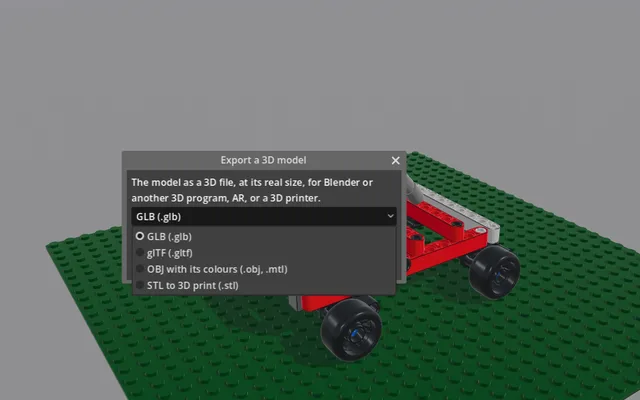
STL, OBJ and GLB
True to size, for a 3D printer, Blender or the web.
Studio’s 3D exports are COLLADA and POV-Ray.
-
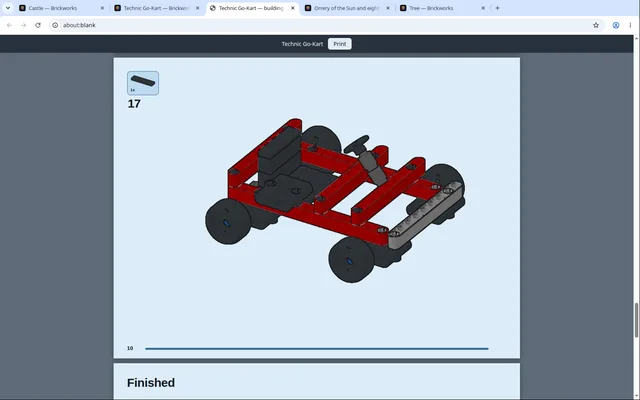
Instructions in one press
A booklet with the parts for every step, laid out for you, then by hand if you like: each step’s view, the page breaks, callouts, new parts outlined. Print it, or save it as a PDF or as PNG pages.
Studio’s Instruction Maker lays out pages and saves them as PDF and PNG too.
Beside the field
Brickworks, Studio, Mecabricks, LeoCAD and LDCad, row by row.
| What | Brickworks | BrickLink Studio | Mecabricks | LeoCAD | LDCad |
|---|---|---|---|---|---|
| Runs on | Any browser, tablets and phones too; Windows, macOS, Linux | Windows, macOS | A browser; touch screens work | Windows, macOS, Linux | Windows, Linux |
| Price | Free | Free | Free; render credits | Free, open source | Free for personal use |
| Connections | Studs, pins, axles and clips join where the real ones do; exact collision | Connectors snap; hinges; collision optional | Snapped by hand, point to point | A grid; no connectivity | Connection snapping |
| Finding a part | By LDraw’s, BrickLink’s or Rebrickable’s name, an element number or a photo; worked constructions | BrickLink numbers, words, size; a palette of sub-assemblies | Its own library | LDraw’s library; search, palettes | LDraw’s library; bins, set inventories |
| Will it stand? | Joints weighed against what their studs hold; the weakest listed, with what would fix it | Weak parts tinted; “very conservative” | — | — | — |
| Gears | Seat in mesh by hand; trains turn at their ratios | Posed by hand | Posed by hand | Posed by hand | Turned by a script |
| Instructions | Worked out, then laid out by hand; print, PDF and PNG | Instruction Maker; PDF and PNG | — | Steps; print, HTML | Steps |
| Rendering | Real time; Render to 4K, turntables | Path traced (Eyesight); POV-Ray | A render farm; a Blender add-on | POV-Ray; Blender | POV-Ray |
| Flexible parts | Hoses, chains and tread by their ends; no bands or springs | The Flex tool | Paths and springs | Hoses, flex axles, strings, shock absorbers | Paths, rubber bands, springs |
| Making parts | Any size or any change, in the app; prints and stickers | PartDesigner, a separate app | Prints; no new shapes | Textures; a minifig wizard | Textures; flexible parts by template |
| Files | In: LDraw, .io, .lxf, and 3D models to brickify. Out: LDraw, .io, glTF, OBJ, STL | In: .io, LDraw, .lxf. Out: LDraw, LXFML, COLLADA, POV-Ray | In: LDD, Studio. Out: OBJ, DAE, STL | In: LDraw, LDD. Out: OBJ, 3DS, COLLADA | LDraw; glTF out |
| Shops and collections | BrickLink and Rebrickable lists; your collection; no prices | BrickLink prices; a wanted list in one click; your collection | CSV, BrickLink XML | BrickLink XML | Rebrickable inventories as bins |
| Building together | Live, by a link: pointers, chat, your own Undo; the desktop app from 0.8.0 | Build Together, live | — | — | — |
| Sharing | A gallery with remixes, comments, embeds and the Tested mark | A gallery | A public library, embeds | — | — |
| Accessibility | A screen reader and the keys alone, in desktop 0.8.0 | Remappable keys | — | High-contrast studs and edges | — |
| AI design | Optional: your own Claude designs and edits; off until you turn it on | — (Sculpture is rule-based) | — | — | — |
— where none was found. Studio 2.26.9, LeoCAD 26.09 and LDCad 1.7 beta; the sources are at the foot of the page. LDD, retired in 2022, and Bricksmith, last released in 2022, are left out.
Where the others still lead
Renders. Studio’s Eyesight is a path tracer, and Mecabricks has a render farm and a Blender add-on. Render here builds a picture from frames drawn in real time; for a path-traced one, export a GLB to Blender.
Prices. Studio is BrickLink’s own app: it shows BrickLink’s prices and puts a model on a wanted list in one click. Brickworks writes the wanted list and the Rebrickable list, with no prices.
Rubber bands and springs. LDCad shapes a rubber band round the circles it passes, and builds springs and shock absorbers. Brickworks lays hoses, chains and tread, not bands or springs.
Years. Studio has years of users, a tutorial at first launch and official videos. Brickworks has an eight-card tour.
Try it on a model of yours
Open your Studio file or a real set in your browser, see whether it stands, and print its booklet. Nothing to install, and free.
An assistant is there if you want one: your own Claude, off until you turn it on. How it works
Sources, read 12 and 13 October 2026, the versions rechecked 24 October. Studio: what it is, snapping, collision, part search, stability check, animation, Instruction Maker, its export, Eyesight, POV-Ray, Flex tool, PartDesigner, import, export formats, prices, wanted list, My Collection, Build Together, Gallery, shortcuts, tutorial, video, Sculpture, release notes. Mecabricks: online only, touch, building, its library, no collision, render farm, Blender add-on, flexible parts, Part Manager, no custom shapes, LDD import, a model’s page. LeoCAD: site, download, no connectivity, library, no physics, history, textures, releases, its 26.09. LDCad: download, FAQ, snapping, interface, collision script, script API, steps, features, flexible parts, 1.7 beta, Rebrickable bins. LDD: retired, in 2022, no stability check.